Ask yourself and whoever that is invovled the following 3 questions and document them. You'll know what to do to make things better the next time.
1. What worked?
2. What didn't work?
3. What could we do differently?
Sunday, August 11, 2019


Sunday, March 31, 2013
"order food online" Google Search Results in Malaysia

I am hungry and I decided to search "order food online" on Google.
Here's the 3 ads that appeared on top.
My commentary:
Ad #1[roomservicedeliveries.com]: Food Delivery in 60 mins? Seriously, I'm hungry.
Ad#2[mcdelivery.com.my]: Looking For Food Delivery? Of course I am freaking looking for food delivery, or else why would I search the term "order food online"? Give me some juice, some benefits, sell your value proposition or tempt me with some juicy burger. The smaller description is slightly better, telling me its available nationwide 24/7. Anyway, McDonald's is well known enough so people who like it will click but the ones sitting on a fence might not be too tempted by this ad.
I signed up and went through email activation, however their database does not have my address and they don't have a feature that allows exception and let a staff process the address, so I can't order online, I can only call. Not so cool but once again, 1300-13-1300 McDelivery jingle in both English and Mandarin has successfully owned a part of my brain from the TV & Radio ads years ago.
Ad#3[getyourfresh.net]: Hmm…This got me curious because I've never heard of them before. It turns out they're in South Dakota, I'm on the other side of the planet. I guess they are not too aware of the geo-targetting features. I wrote them an email letting them know that.
I am surprised that FoodPanda.my is not there. Rocket Internet, what happened to you? Maybe they've tried and they didn't get much conversions or their strategy is not on search when it comes to food.
Thursday, November 01, 2012
BAJET 2013 INFOGRAPHIC: WHAT MALAYSIAN SOCIAL MEDIA USERS THINK ABOUT BAJET 2013?
Not long ago, the SAYS community wanted to find out what Malaysian social media users like you thought about the 2013 Budget. If you answered the survey from SAYS recently, you made it into this infographic! :)
Interesting? Share with fellow Malaysians, guys! We also provided the embed code for websites & blogs at the bottom after the infographic.

Copy & Paste to embed this infographic on your website or blog:


Copy & Paste to embed this infographic on your website or blog:
Share or Tweet

Saturday, October 06, 2012
3 Awesome Productivity Boosting Features from Stainless Browser for Mac

If you're not in the mood to read, just download this awesome multi-processing browser for OS X called Stainless and test it out!
As I was looking into Google Analytics to study page speed for SAYS.com on different browsers, I saw a significant improvement in Internet Explorer's performance since IE9, the average page loading time for Internet Explorer was significantly faster than Chrome, Firefox and Safari. What a pleasant surprise.
Contemplating buying a non Mac just so I can have IE9My colleagues and friends that are on Windows, learn more about IE9 here: http://www.beautyoftheweb.com.my/
— Tom Philp (@thomasphilp) June 2, 2012
Well, I'm not going to change my operating system like the guy above and he could just install a virtual machine if he wants, so I started looking for alternative browsers for Mac other than the usual Google Chrome, Firefox, Safari, Opera.
Found 2 browsers that got some good reviews.
1. Stainless - An indie version of Chrome
2. Camino - An indie version of Firefox
YES, I'm now using Stainless and I'm loving it. It just has features that answers the browser woes of modern day internet users that multitask a lot with different logins. Its not new, its just that I've never heard of it before.
I'll summarise it to 3 main awesome points of Stainless that will boost your productivity!
1. Each Tab runs independently in a separate process
Remember your whole browser gets slowed down or crash because of 1 page is crappy? This won't happen with Stainless, because each tab runs separately!
2. Parallel sessions, which allow you to log into a website using different accounts in separate tabs at the same time.
I used to use Chrome and Firefox to separate work and personal accounts. When I needed to login another account, I use Chrome's incognito mode but no matter how many different windows or tab you have, its still the same session.
3. Much awaited Session-Aware Bookmarks on a slim and sexy side bar
What's more awesome is that on top of the parallel sessions, bookmarks in Stainless "brings along" their respective web cookies which may override cookies in other sessions.
 |
| See my bookmarks of my work & personal mail, different twitter and SAYS.com accounts for different countries that I use for work. I no longer have to login one by one over and over again. |
What this means is, if you open a new Single Session tab, log into Gmail with "Stay signed in" checked, then save a bookmark from your Single Session, your login to Gmail will be saved along with the book mark.
So the combo of Session-Aware bookmarks and Single Session tabs allows you to save multiple bookmarks to web sites and services where you may have more than one account.
I just installed it however be mindful that Stainless is still in development and doesn't yet have all the features you'd find in a production-ready browser. You can still use it though, just download it here.
Friday, September 28, 2012
Drea-ea-ea-ea-eam
Drea-ea-ea-ea-eam, dream, dream, dream
Drea-ea-ea-ea-eam, dream, dream, dream
When I want you...
Mood for the morning... Quiet in the office today...
Have you heard of this song before?
Mood for the morning... Quiet in the office today...
Have you heard of this song before?
Saturday, August 11, 2012
Long Term Solution for your Mac Desktop Screenshot Clutter
[Mips #3]
Now I know you love taking screenshots on your Mac, the fact that its so easy, you start by taking important screenshots then you slowly develop a habit of taking any screen that interests you that you might not even use in aeons until you've stuffed enough files on your Chimpanzee desktop wallpaper and feel like vomiting when you look at it, then you start organizing the screenshots manually in your folders and because you absolutely love taking useless screenshots, you end up getting fed up having to organize them periodically.
See also: 6 Different Screenshot Shortcuts on Mac

Here's a long term solution for Mac Screenshot Lovers, get your Mac to automatically save the screenshots in a separate folder.
STEP 0
Create a new folder that you'd like the screenshots to save in. You don't have to do this if you want the screenshots to save in an existing folder. Make sure the folder name has no space in it, if not it won't work. In this case, I created a folder on my desktop and renamed it to 'screenshot'.


STEP 1
Go to Spotlight on the top corner of your screen and type 'terminal' then open the application.


Now I know you love taking screenshots on your Mac, the fact that its so easy, you start by taking important screenshots then you slowly develop a habit of taking any screen that interests you that you might not even use in aeons until you've stuffed enough files on your Chimpanzee desktop wallpaper and feel like vomiting when you look at it, then you start organizing the screenshots manually in your folders and because you absolutely love taking useless screenshots, you end up getting fed up having to organize them periodically.
See also: 6 Different Screenshot Shortcuts on Mac

Here's a long term solution for Mac Screenshot Lovers, get your Mac to automatically save the screenshots in a separate folder.
STEP 0
Create a new folder that you'd like the screenshots to save in. You don't have to do this if you want the screenshots to save in an existing folder. Make sure the folder name has no space in it, if not it won't work. In this case, I created a folder on my desktop and renamed it to 'screenshot'.


STEP 1
Go to Spotlight on the top corner of your screen and type 'terminal' then open the application.

STEP 2
Type the command below in Terminal and press enter to execute. You have to change the username and foldername in the command below according to your Mac(highlighted in green below). Once again, make sure your folder name has no space in it or else it won't work.
defaults write com.apple.screencapture location /Users/username/desktop/foldername

Note: resh = Mac username & screenshots = specified folder on desktop
STEP 3
Now, type and execute the command below in Terminal
killall SystemUIServer

Close the Terminal application and you're done! Screenshots taken now will save in the specified folder!
6 Different Screenshot Shortcuts on Mac

[Mips #2]
The screenshot features on Mac are one of the many reasons I like the Mac. It's easy & convenient, I'm sharing 6 shortcut keys, you don't really need to remember all of them, just learn the first 2 if you're a casual user.
The screenshot features on Mac are one of the many reasons I like the Mac. It's easy & convenient, I'm sharing 6 shortcut keys, you don't really need to remember all of them, just learn the first 2 if you're a casual user.
MAC SCREENSHOTS SAVED ON DESKTOP
1.Command + Shift + 3
To take the whole screen
To take the whole screen
2.Command + Shift + 4
To take a specific part of the screen. A cross icon will appear. Click and drag across the region you'd like to capture and it'll save on your desktop once you let go.
see also: Long Term Solution for your Mac Desktop Screenshot Clutter
To take a specific part of the screen. A cross icon will appear. Click and drag across the region you'd like to capture and it'll save on your desktop once you let go.
see also: Long Term Solution for your Mac Desktop Screenshot Clutter
3.Command + Shift + 4, and then press Space bar
And click on a specific element of screen as a window, Dock, menu, icon etc. It’ll capture that specific element's screen and save on your desktop.
And click on a specific element of screen as a window, Dock, menu, icon etc. It’ll capture that specific element's screen and save on your desktop.
MAC SCREENSHOTS SAVED ON CLIPBOARD
The following is useful when you intend to use the screenshot for a report or design, by saving it on the clipboard you can easily paste the screenshot afterwards by pressing Command + v(Paste) on the desired window, be it, Word, PowerPoint, Photoshop etc.
4.Command + Control + Shift + 3
Takes the whole screen and saves on clipboard
Takes the whole screen and saves on clipboard
5.Command + Control + Shift + 4
To take a specific part of the screen. A cross icon will appear. Click and drag across the region you'd like to capture and it'll save on your clipboard once you let go.
To take a specific part of the screen. A cross icon will appear. Click and drag across the region you'd like to capture and it'll save on your clipboard once you let go.
6.Command + Control + Shift + 4, and then press Space bar
And click on specific element of screen as a window, Dock, menu, icon etc. It’ll capture that element’s screen and save on your clipboard
And click on specific element of screen as a window, Dock, menu, icon etc. It’ll capture that element’s screen and save on your clipboard
Tuesday, July 10, 2012
Using NTFS on Mac
[Mips #1]
Yesterday I needed to transfer some files from my laptop to my hard disk and realize that I couldn't because I'm using a MacBook and my external HDD was running on NTFS.
I realized that I haven't install Paragon's NTFS for Mac on this MacBook.
Why do I need to install that? Very simple because Mac OS does not support writing on NTFS(New Technology File System) the same way Windows does not support HFS(Hierarchical File System). You can read the data meaning you can open or copy files from NTFS but you can't write(edit,add files etc).
However both operating systems can read & write on FAT(File Allocation Table).
Things you don't really need to know:
NTFS developed by Windows for Windows
HFS developed by Apple for Apple
FAT for older versions of Windows & MS-DOS
If you'd like to know more about file systems, check these pages on Wikipedia: NTFS HFS FAT32
Why did I format my HDD to NTFS instead of FAT32 since it works on both platforms or HFS since I'm using a MacBook?
1. FAT32 is old and has its limitations. It has a maximum file size of 4GB, so any single file that is larger than 4GB cannot be stored in FAT32. I wouldn't be able to store HD movies or application setup files in it.
2. Not everyone uses a Mac, with HFS, I wouldn't be able to share the files in my HDD with my friends on Windows. Plus, the common TVs with USB port can't read HFS, that means I can't watch HD movies on TVs with my HDD as the input source.
Solution:
Install NTFS for Mac OSX, once you've installed it, you'll be able to read & write seamlessly.
You can get the trial version for free. The full version is priced at $19.95
http://www.paragon-software.com/home/ntfs-mac/download.html
You can also torrent it here (at your own risk):
http://thepiratebay.se/torrent/6403969/Paragon.NTFS.for.Mac.v9.0.1.MacOSX.Incl.Keymaker-CORE
If you don't know how to use torrent, learn here.
Yesterday I needed to transfer some files from my laptop to my hard disk and realize that I couldn't because I'm using a MacBook and my external HDD was running on NTFS.
I realized that I haven't install Paragon's NTFS for Mac on this MacBook.
Why do I need to install that? Very simple because Mac OS does not support writing on NTFS(New Technology File System) the same way Windows does not support HFS(Hierarchical File System). You can read the data meaning you can open or copy files from NTFS but you can't write(edit,add files etc).
However both operating systems can read & write on FAT(File Allocation Table).
Things you don't really need to know:
NTFS developed by Windows for Windows
HFS developed by Apple for Apple
FAT for older versions of Windows & MS-DOS
If you'd like to know more about file systems, check these pages on Wikipedia: NTFS HFS FAT32
Why did I format my HDD to NTFS instead of FAT32 since it works on both platforms or HFS since I'm using a MacBook?
1. FAT32 is old and has its limitations. It has a maximum file size of 4GB, so any single file that is larger than 4GB cannot be stored in FAT32. I wouldn't be able to store HD movies or application setup files in it.
2. Not everyone uses a Mac, with HFS, I wouldn't be able to share the files in my HDD with my friends on Windows. Plus, the common TVs with USB port can't read HFS, that means I can't watch HD movies on TVs with my HDD as the input source.
Solution:
Install NTFS for Mac OSX, once you've installed it, you'll be able to read & write seamlessly.
You can get the trial version for free. The full version is priced at $19.95
http://www.paragon-software.com/home/ntfs-mac/download.html
You can also torrent it here (at your own risk):
http://thepiratebay.se/torrent/6403969/Paragon.NTFS.for.Mac.v9.0.1.MacOSX.Incl.Keymaker-CORE
If you don't know how to use torrent, learn here.
Mips, my way of calling Mac Tips.
Friday, July 06, 2012
Just found this post in my drafts..Written 2009
I went to Sunway Lagoon yesterday. I was with my high school buddies. We were all very enthusiastic about reliving the happy moments at the park like we did 2 years ago. We changed into swimming attire and rushed to the water park. At that point of time, I would say anyone can easily notice the eagerness in our eyes. I carried the float and ran up the stairs to the water ride, looking forward to some thrills and spills. We placed our floats and sat there, we gave each other the "this is gonna be fun" look, 3...2...1...GO!!! Within 2 seconds, I didn't feel what I was expecting, the water was not flowing fast enough and extra resistant strips were added. We went on all the other rides thereafter but it seems like Mr.Thrill decided to take a nap. Although the excitement level of the rides have been reduced to cut electricity and water cost, it somehow made me think was it because of the physical factor or maybe we no longer get excited by water rides. At the end, I think its because our expectations was too high, as my friend told me, memory is sometimes better than reality.
Tuesday, October 19, 2010
Love my Grandma and all the people
Several days ago, I watched a video that was posted by a few of my friends.
It was captioned "GUYS JUST TAKE 3 MIN AND 7 SECONDS FROM YOUR BUSY LIFE TO SEE THIS VIDEO...... PLZZZZ..."
Watch the video here: http://www.facebook.com/video/video.php?v=130929080292037
It moved me.
I decided to look more into this matter and read up about charity water.
Seeing other people living without safe water to drink made me feel compelled to do something.
Tomorrow is my Grandmother's 74th birthday and I bought an eCard for $20 and 100% of it will contribute towards well drilling.

This is how it looks like.
20 US Dollars can provide one person with clean water in a developing country for 20 years.
Spread the Love.

My Grandma and I last month when she took care of me because I was having Chicken Pox
Happy Birthday 婆婆!
Watch the video here: http://www.facebook.com/video/video.php?v=130929080292037
If you decide you want to donate or buy a card for someone:http://www.charitywater.org/donate/
Video posted by: Danisha Kaura
Friends who shared the link as of 19/10/2010 : Glen Choo, Nigel Law, Aamir, Liu Wen Hang, Lim Wei Sern, Jennifer Ooi, Sim Li Qian, Lee Chun How, Yiap Fu Hui, Lennard Chua, Leiah Wan, Steve Koay, Tzeyee Lee, Teoh Chin Yee and Luisa Lee.
I used to think it is better to donate anonymously and my dad told me that it is about intent. If we do a good deed and show off to boost our ego, then it is of no good, If we are sharing a good deed that we did to encourage other people to do it and its great. So let's spread the kindness!
Friday, January 01, 2010
31.12.09
On the last day of 2009, I woke up at 7.00am and did my morning routine. Hesitation was enticing me not to perform what I was about to do later. I didn't want to succumb to the temptation of escaping.
I drove to Taman Free School flats. A force in my heart asked me to just say no as I walked through the stalls in the market with a plastic bag in hand. I kept walking. I saw Ku Ku* sitting at the steps of the middle compound waiting for me as promised. Our appointment was 8.30am and I was on time.
*Ku Ku - In Chinese, it means the sister of your father, your aunt on the paternal side. This Ku Ku is my babysitter. I was under her care from when I was nine months old till I was thirteen.
As I walked towards her, I felt like I needed to pee. At first I thought it was hesitation calling again but I talked sense to myself. Am I going to pee because I am afraid of doing what I'm about to do or I genuinely needed to pee? Should I do it then pee? or Should I go pee first? If I pee now, am I not going to do it? I figured I should just pee and then do it,that will really make me feel more comfortable.
Ku Ku told me to pee in the Kopitiam at the corner lot. She said just go pee there and we'll have our breakfast there later. I was hesitant, I told her I better walk further and go to Medan Selera. She said its not open on Thursdays then I went to the Kopitiam and left the plastic bag with her. There was a lady queuing at the toilet. Once again I wanted to go to Medan Selera but before I made my decision the lady queuing fled so I stayed as it should be vacant soon since there was a person waiting in front of me. I relieved nature's calling and went back to my Ku Ku.
She said she wants to buy a few stuff from Yeong Fo Lou* and she'll reintroduce me to him. She picked a lidi broom and as she paid for it, she asked the boss whether he recognized me, I'm the kid she brought up, he politely said that of course he remembers if she says it.
*Yeong Fo Lou - In Cantonese, it means the guy that sells western goods.
I spoke. I told him when I was still small, I lost my mechanical pencil's cover. I went to his shop and stole the cover of a mechanical pencil to replace mine. I was there to apologize. Ku Ku repeated what I just said to him in her own words. He with his wife beside said its not a big deal, little children are mischievous. I gave him the plastic bag and put on his counter. There was 2 boxes of biscuits from Him Heang together with a white envelope that contained a ten ringgit note. He said he can't finish so many biscuits and wanted to give a box to my Ku Ku, I told him I've given her biscuits too.
He and his wife then shared their experiences on this matter. Many children stole goods from their shop along the years. She said that usually people drop an envelope with a letter and some money in their shop to tell them they stole a pencil box or something. They do not know who they are. I was glad.
Ku Ku and I then moved on for Char Koay Kak.
Sunday, November 22, 2009
My New Induction Stove
I bought a new Induction Stove.
You might be curious how an Induction Stove actually works. The history of a stove starts with A long long time ago, in a far far galaxy, just go to wikipedia and find out how it works. :P

The older one that I had went out of service and we hadn't replaced it for 3 weeks so one can imagine the amount of arena mamak thrash* and instant food we consumed. We basically cooked with a toaster oven and a rice cooker with a damaged teflon inner pot.
Just in case you're curious why I didn't consider a gas stove, it is to save the lives of arena green residents. Students might be careless with gas.
An induction stove is actually a very neat invention. It heats up really fast and it only cooks the food,not you. However, it is not conducive for stir frying because the food sticks on the pan before its cooked. Its either because it heats up too fast and/or the nature of the induction stove that uses magnetic energy to entice friction among molecules of metal messes with the food molecule as well(Don't believe me because I don't even fully believe myself in this). You can only use pots and pans that are made of metals that are magnetic,so if you want to know whether a pot can be used on an induction stove,just place a piece of magnet on it. The bottom has to be flat too.
Sorry for the late update but better late than never. Thanks for reading.
Tuesday, November 17, 2009
My Comeback
Ladies and Gentlemen, This is Me, This is LogicYuan.
For the past months, I have been focusing on my own development and keeping things I see,think and do to myself. Other than sharing to those around me, I have been neglecting a broader scope of people that follow my blog. All of a sudden, I felt selfish for not blogging. So I am now announcing my comeback! Be sure to see the next post by this Friday!
Monday, August 31, 2009
Sorry for the long halt
This Blog will be under construction for the next couple of weeks and soon you will see a fresh LogicYuan.blogspot.com~! Stay tune!
Saturday, July 04, 2009
APIIT Bus Collision at Bukit Jalil LRT Station
See the photos and the text report is below.


On the afternoon of 3 July there was a severe collision involving the APIIT UCTI bus and a taxi. The bus in question was assigned LRT rounds on the day, and it was on its way to its destination when the collision took place. From several sources I have compiled this appropriately detailed report.
The bus carrying students to the LRT station from the college was on Lebuhraya Shah Alam, an expressway, about to turn into the Jalan Merah Cager, a busy junction due to there being a traffic signal. It was then that the bus driver realized that he couldn’t engage the breaks on the bus which was travelling fast but within limits.
According to accounts from several witnesses of the collision, the driver first used the pedal to brake, and that was when the brakes on the bus failed. Several people claimed that they saw sparks when the brakes were engaged, the sparks were issuing from the wheel arches of the bus, probably because the front left tire had exploded.
The driver however was determined to stop the bus and by this time he had already entered Jalan Merah Cager, barely keeping the bus steady on the corner as he tried, without prevail, to engage the hand break failing again to stop the bus.
At this point, further ahead, a taxi was cruising on the lane closest to the sidewalk, also driving his customer to the LRT station. Meanwhile the bus driver was now attempting to turn off the road, but given the speed, and no way to stop, he rammed the taxi in the rear and shattered the rear windscreen. The taxi was now moving sideways until it hit one of the pillars on the sidewalk, which supports the canopy. This made the taxi’s front end lurch to the left and ram into the other pillars of the canopy, which no longer stood shading the sidewalk, and instead crumpled to a heap on the side.
The bus however is a much heavier vehicle and so after it rammed into the taxi, it continued to advance right at the side walk at a 45 degree angle, at which point the front of the bus crashed right into the canopy at speed. As the canopy, which was made from tin, wrapped around the front, the bus had already gone completely across the sidewalk and that was when it finally came to a halt.
According the reports from witnesses, there was a woman in the taxi, who exit the taxi after the collision. She had suffered from cuts to her hands while coming out of the taxi due to the broken glass, and so she was bleeding. Reports also suggest that she was in shock when she emerged from the wreck. The students on the bus were all fine; apparently everyone was seated at the time of the crash which preventing them from being harmed in this unfortunate collision.
Credits to Sami,Sammie,Michael Lim,Saeid Hedari,Derek Ooi,Saeed (seebChe)
Below is the gif I made with the photos I took after they moved the bus so that it can be towed away.

Friday, June 12, 2009
I stood in front of the bus APIIT UCTI
My name is Loh Ji Yuan and I stopped the bus.
Around 9 o'clock in the morning, a yellow Bas Sekolah with a tiny APIIT/UCTI logo at its windscreen was stopping in front of the yellow box after the traffic light near Gate 1( near 7 Eleven) of Arena Green Apartments. It was a bus coming from Vista Komanwel going towards APIIT/UCTI’s Building in Technology Park Malaysia. It had stopped there for more than 30 seconds because of the traffic congestion.
I decided to cross the road from Arena Green to enter the bus. So I crossed the road and I looked at the traffic in front of the bus and made sure that the traffic in front is static. At that point in time, I knocked on the door of the bus. The bus driver that wore spectacles was on duty for that shift. He refused to open the door for me while the traffic was not moving.
So I walked from the side and stood in front of the bus to ask the bus driver to open the door for me and once again he refused.
I opened my arms wide and demanded, “WHY? WHY? WHY?”. The bus driver moved the bus forward even though he was fully aware that I was standing right in front of the bus. I did not budge, planting both of my feet firmly on the ground. The bus driver stepped on his brakes inches before me. I again continued to ask him “WHY? WHY? WHY?”.
At that moment, he opened the bus door to take my student ID, asked me to take it back from Mr. Anthony who is in charge of student discipline and then he ran back into the bus. I entered the bus before he closed the door. Minutes later, I finally set foot in APIIT.
That was what happened on 9th June 2009.
__________________________________________________________________
What went through my mind when I decided to stand in front of the bus?
I felt cheated. I felt I wasn’t being treated fairly. I felt I was being discriminated against. I stopped the bus. The fact that I felt discriminated was because the buses on numerous occasions picked up many other people from many different spots including the exact spot where I tried to catch the bus. I had to ask “WHY?”, what was the reason?
It’s moments like this that pushes people beyond their limits. There I stood, risking my life, irrationally. I have to apologize to all the ones that love me especially my parents but all I wanted, and stood for, was equal treatment.
___________________________________________________________________
I queued outside Mr.Anthony’s office waiting for my turn to see him. When my turn came, I walked into his room and told him I was there to take my student ID. He turned his head and spoke to Mr.Selva and said: “This is the boy who stopped the bus.” He told me that the buses are supposed to only stop at designated spots and not anywhere else. Vista Komanwel buses are not supposed to pick up students from Arena Green, only buses coming from the LRT station can pick up students from Arena Green, according to him. I tried not to react, I did not want to say something I would regret because I had anger in me. They told me that they would send a letter to inform my parents about this incident and warned me that if I stopped the bus once more I would have to face the disciplinary board. Mr. Anthony asked why I stood in front of the bus and wondered what could have happened, if the bus driver had been arrogant and if he had decided to not stop and drive over me. I told him I could have been injured or worse lost my life. After the discussion, I got my student ID and left.
I went for lunch and calmed myself down. I went to Mr. Anthony’s office again with my reasoning and thoughts that I couldn’t answer during the first session. I then expressed what went through my mind when I risked my life to stop the bus, which I have explained above. I made suggestions that they have proper signs to tell students about the designated spots.
Mr. Anthony accepted my suggestions but Mr. Selva interrupted and said that the location of the designated spots is a known fact to all the students and questioned me whether they have to have a large signboard showing people that? I admitted my mistake for being irrational and I said that I know I was wrong to stop the bus. I was merely trying to tell them why I did what I did. The first reason is because there was no proper notices on the bus that tells us where they should or should not stop. The second, is how the bus stopped for other people and not me.
Mr. Selva once again told me that I was wrong to do what I did. Again I explained that I knew I was wrong and admitted my mistake. But I was merely trying to tell them why I did what I did. Mr. Anthony suggested we end the conversation because we were going round and round and so we left his room.
I am glad that I stood up for something that I believed in but I feel guilt about the means I chose to stand up for my belief. It shouldn’t have been so reckless. So it doesn’t feel right and in fact quite wrong. So do not let your self do something like this.
Friday, May 29, 2009
StudentARC Leadership Camp 2009 #3
After the land mine exercise, comes this activity that tests our leadership,listening,courage and trust. 4 members have to stand on the 5 chairs in which 2 have to be blindfolded and the other two will have their hands tied up. The group leader will stay on the ground and provide instructions to the members and one tough guy will standby behind the people in case of accidents.
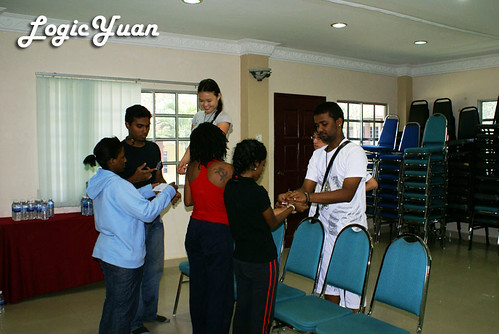

oops...that seems like an interesting angle? haha *you know what I mean?*

SARC members strategizing with mineral watter bottles before going on the battlefield.

The two star wannabies Nomin from Mongolia and Leka from Tanzania.
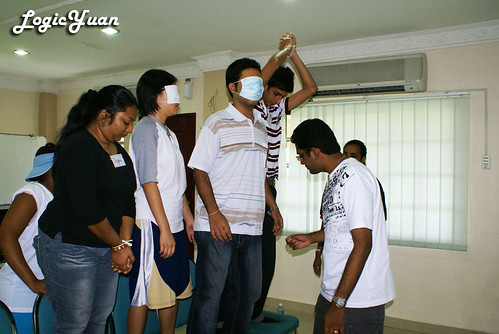
Muru and Jaskirat, both focusing at the same section.

Judith got excited!

I had that "that's so easy!" look and Ike had the "I hope you know what you're doing" look.
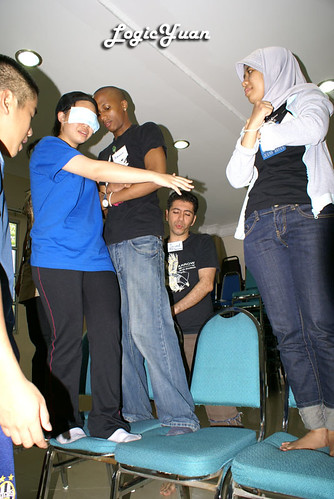
My group in action!
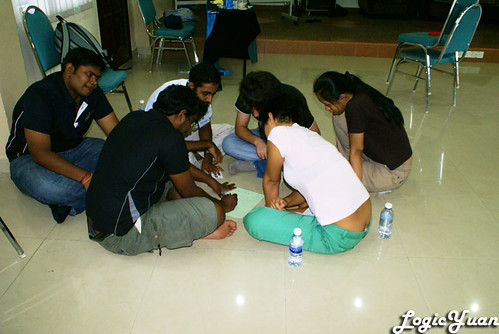
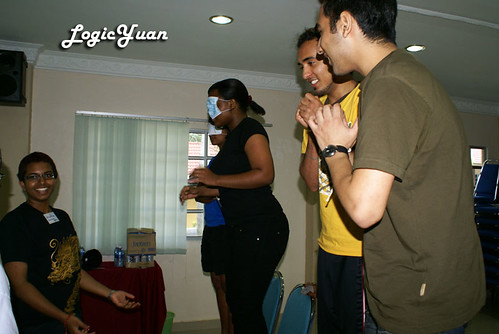

All the guys were trying to look away while the girls was trying to...
 :)
:)Thursday, May 21, 2009
Appreciation Day 2009 Superhero Award Winners

Superman : Mr. Jerry Chong Chean Fuh

Batman : Mr.Saw Looi Beng

Wolverine : Mr. Suresh Naidu

Storm : Melissa Migin

Catwoman : Ms. Lua Sharmini

Wonder Woman : Ms.Judyanne Sharmini
Credits: Derek Ooi
Sunday, May 17, 2009
Rescue the dogs

Full story Click HERE.
Look at these brave ladies trying to save the dogs by risking being bitten by poisonous snakes in the magrove. The least we could do is to donate some money, bet it 5 cents or 500 ringgit, we do what we can! I am planning to gather some money from all my friends and bank in to their CIMB account. It would be best if you could donate through CIMB online or Paypal on your own, but it would be more convenient to pass the money to me then feel free to do so.
For rescue updates Click HERE.
What I'm Doing in Penang
Many of you are curious, what do I do in Penang?
Well I can honestly tell you, I practically want to do nothing when I am back home besides helping my mom with her chores.
When I do not have any responsibilities, I rest and forget all my worries with a cup of Kopi-O.

Photo taken with Sony Ericsson K800i at Toh-Soon Cafe(off Campbell Street).
Just in case if you wonder why my spectacles looks a little unique, they are not sunglasses, those are Therapeutic Pinhole Glasses.
Subscribe to:
Posts (Atom)